
The Effort to Reach: Designing for Fitts’s Law
Apply Fitts’s Law to real interfaces: improve target size, spacing, and placement while preserving accessibility, clear choices, and reliable recovery.
Fitts’s Law describes how movement time depends on the distance to a target and the target’s width. In comparable pointing conditions, a larger target or a shorter journey generally makes acquisition easier. For interface design, that means giving actions a usable hit area, separating competing controls, and placing the next step where the task makes it useful.
The interesting work starts when those goals compete.
An interface can have generously sized buttons and still make someone travel across the screen after every edit. It can put actions close together and make the wrong one dangerously easy to hit. It can enlarge an invisible click area without giving anyone confidence that the area is available.
This seventh installment of Applied Design Theory examines those tradeoffs. My central argument is that a target should be easy to acquire in the context of an intentional action. Size matters, but so do the path, the surrounding controls, and what happens after a mistake.
The previous article, The Cost of a Pause, looked at what happens after someone acts. Here, we move one step earlier: the effort required to make that action land.
What Fitts’s Law Actually Models
Paul Fitts’s 1954 paper investigated the relationship between movement and precision using controlled motor tasks, including repeated tapping between targets. The work connected the demands of movement with ideas from information theory. It preceded modern graphical interfaces; it was not a study of mobile checkout buttons. MacKenzie’s 1992 research review explains the original experiments and their later application to computer input.
The practical distinction is between reaching a known target and completing an entire task. Finding a control, interpreting its label, deciding whether to proceed, moving to it, activating it, and waiting for the result are different parts of an interaction. Fitts’s Law is especially useful for examining the movement component. It does not turn every delay into a target-size problem.
Consider a hypothetical account page with an unfamiliar icon labeled only by a tooltip. Increasing the button’s hit area might make it easier to select after someone identifies it. That change would not explain what the icon means. A clear label addresses a different obstacle.
That distinction connects to The Decision Tax: a well-placed target cannot compensate for an unclear choice. The user needs both a decision they understand and a control they can operate.
Read the Equation Without Inventing Precision
A common version used in human-computer interaction is the Shannon formulation:
MT = a + b × log₂(1 + D / W)
Here, MT is predicted movement time, D is movement distance, and W represents target width for the modeled task. The coefficients a and b are fitted from observations. They are not universal constants that can be copied into every product. MacKenzie’s 1989 paper develops this formulation; the added 1 distinguishes it from the familiar original logarithmic form.
The logarithmic term is the index of difficulty. We can use it to compare hypothetical geometry without pretending to know how many milliseconds a particular user will need.
| Illustrative condition | Distance D | Width W | log₂(1 + D / W) |
|---|---|---|---|
| Baseline | 240 | 24 | 3.46 bits |
| Double the width | 240 | 48 | 2.58 bits |
| Halve the distance | 120 | 24 | 2.58 bits |
| Do both | 120 | 48 | 1.81 bits |
These are calculated examples in consistent arbitrary distance units, not measured user results. They show why size and placement deserve attention together. In this simplified comparison, doubling width and halving distance produce the same ratio. Neither calculation establishes a percentage improvement in task completion or conversion.
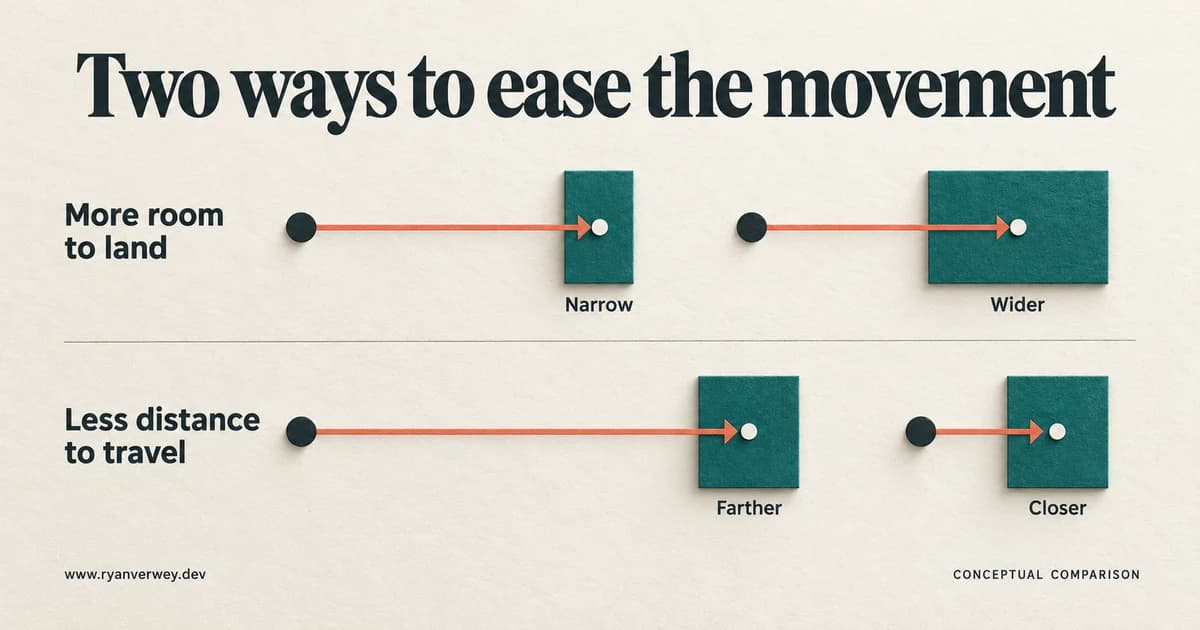
Figure 1. Two variables to inspect: the room available for landing and the distance to reach it. The illustration is schematic, not a scale drawing or measured performance chart.
Width Is More Specific Than Overall Area
A long, shallow button can occupy plenty of pixels while still demanding precise vertical positioning. In the basic one-dimensional model, width is measured along the movement axis. Real interfaces introduce two-dimensional shapes and different approach directions.
MacKenzie and Buxton’s 1992 experiment compared alternative ways of representing target width for rectangular targets. Their results support taking both dimensions seriously instead of automatically treating a rectangle’s horizontal length as its usable width.
For a design review, I would inspect the shortest dimension, the likely approach, and the entire interactive boundary. A wide text link with very little height should not receive a free pass because it looks substantial in a screenshot. Nor would I use the experiment’s fitted coefficients as a performance promise for a different device or audience.
Design the Hit Area, Then Make It Understandable
The visible symbol and the interactive region are separate design decisions.
Imagine an overflow menu represented by three dots in a table row. The dots might be visually small because they are a secondary action. That does not require making those few painted pixels the entire target. A real button can provide padding around the icon, an accessible name, and a visible interaction state.
The next question is whether people can recognize that larger area. Budiu’s Nielsen Norman Group article notes that invisible padding may leave users aiming cautiously at the visible symbol. My application of that observation is to make the button’s shape or surrounding treatment communicate its operable area, particularly for important actions.
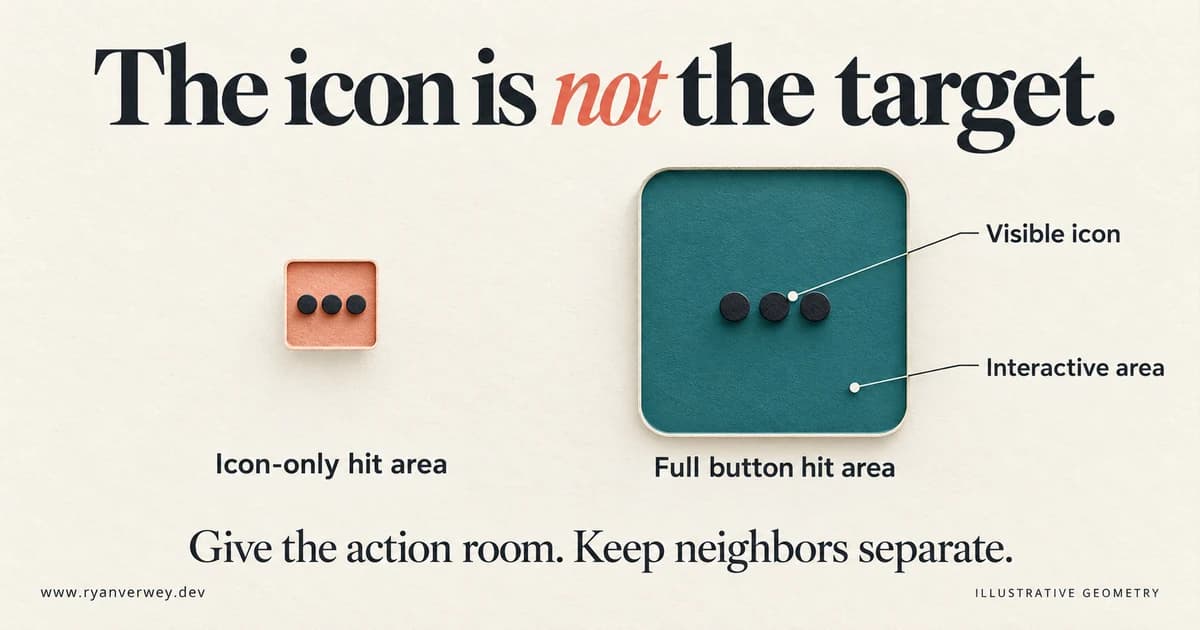
Figure 2. The active region can extend beyond the icon. This conceptual comparison is not a pixel specification; verify the actual boundaries in the implementation.
Here is a small implementation example. It uses an ordinary button rather than attaching behavior directly to an icon:
<button class="row-action" type="button" aria-label="More actions for Quarterly report">
  <span aria-hidden="true">•••</span>
</button>
.row-action {
  display: inline-flex;
  align-items: center;
  justify-content: center;
  min-inline-size: 48px;
  min-block-size: 48px;
  padding: 8px;
  border: 1px solid currentColor;
  border-radius: 8px;
  color: #173b3b;
  background: #fff;
}

.row-action:focus-visible {
  outline: 3px solid #005fcc;
  outline-offset: 3px;
}
The 48-pixel dimensions are an example design choice, not a value derived from Fitts’s equation. A production menu still needs appropriate expanded-state communication, menu behavior, and focus management. This fragment only demonstrates how the button owns its hit area. W3C’s CSS target-size technique similarly distinguishes a control’s size from its text or icon.
I would test the padded edges, not just the center. I would also check whether a parent clips the control, a neighboring link overlaps it, or a transparent overlay intercepts the click. A component’s declared dimensions are only useful if the resulting region actually activates the intended action.
For a design system, this belongs in the shared control. Fixing twenty individual icons independently creates twenty opportunities for the next screen to behave differently. This is the kind of implementation responsibility I discuss in my Atomic Design work: reusable components should carry dependable behavior as well as consistent appearance.
Size and Spacing Solve Different Problems
Size gives the intended action a larger landing region. Spacing helps keep a near miss from becoming another action. Increasing one does not automatically improve the other.
In our hypothetical table, suppose Edit and Delete sit side by side. Expanding both hit areas through overlapping invisible regions would make ownership ambiguous. Increasing padding within two distinct buttons, then giving the controls separation, creates a clearer result.
I would also question whether those actions belong together in that form. Frequent editing and occasional deletion may deserve different presentation. That is a task and consequence judgment, not a claim that Fitts’s Law prescribes a particular menu layout.
Spacing also has a cost. Pushing every control far apart can make sequential work tedious and force more scrolling. The goal is enough separation to distinguish actions while keeping related work reasonably close. Inspect the surrounding target boundaries instead of choosing a gap token in isolation.
What WCAG Requires, and What It Does Not
For web interfaces, two different target-size criteria are often confused:
| WCAG criterion | Level | Size requirement before exceptions |
|---|---|---|
| 2.5.8 Target Size (Minimum) | AA | At least 24 × 24 CSS pixels |
| 2.5.5 Target Size (Enhanced) | AAA | At least 44 × 44 CSS pixels |
Under 2.5.8, an undersized target can satisfy the spacing exception when a 24-CSS-pixel-diameter circle centered on its bounding box does not intersect another target or the corresponding circle around another undersized target. Other exceptions cover equivalent controls, inline targets, unmodified user-agent controls, and essential presentation.
The enhanced criterion has its own exceptions, including equivalent controls and inline targets. It does not provide the same spacing exception.
These are requirements for pointer targets, not only touchscreens. CSS pixels also are not physical screen pixels. Passing one target-size criterion does not establish overall WCAG conformance, and a minimum is not a guarantee of comfortable operation.
For this example, I chose a roomier button because repeated table actions deserve more than a borderline pass. In another interface, I would evaluate density, user needs, and observed errors before choosing the component’s dimensions. I would record an exception when relying on one, rather than turning “there is some whitespace” into an accessibility claim.
Place Controls Along the Task
Distance only becomes meaningful when we identify a starting point.
In an illustrative form, a person completes the final field near the bottom, then travels back to a small Save control in the header. Placing a clearly labeled action after the fields offers a more direct continuation. That recommendation assumes the person is finishing the form in that sequence. It is not evidence that every page needs a fixed bottom bar.
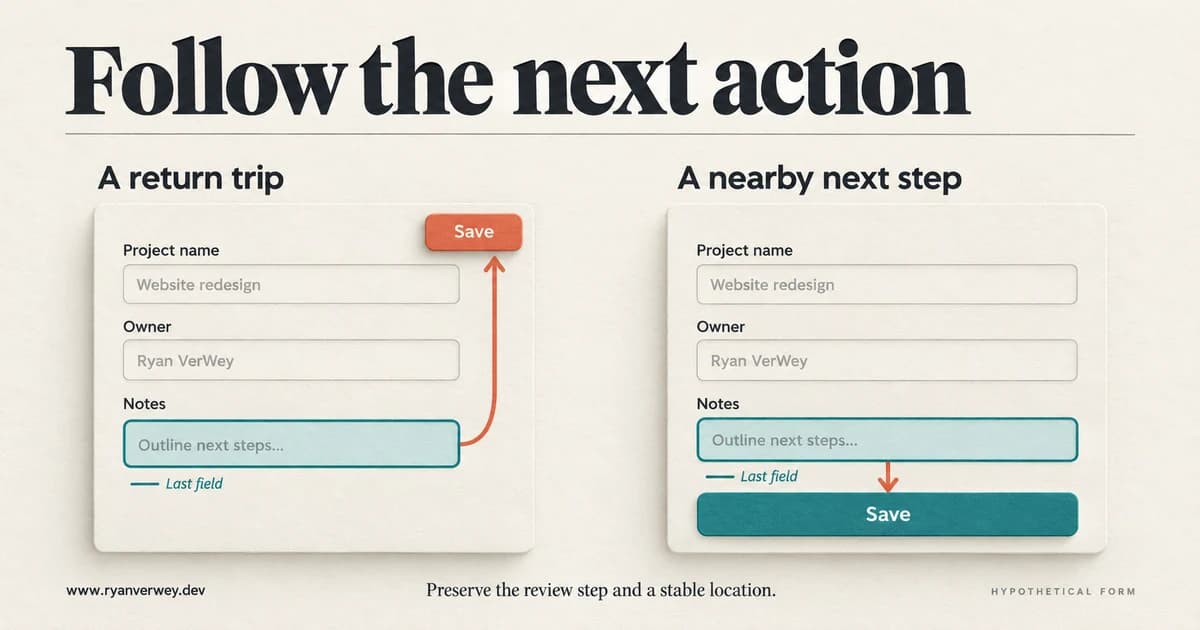
Figure 3. A task-relative placement comparison. The alternative changes both placement and target size, so it cannot isolate the effect of either variable. These are invented layouts, not tested product results.
The distinction matters on complex screens. A report builder might have several entry points: editing a title, changing a filter, selecting rows, or inspecting a chart. There may be no single last field and no universal best location for Save.
I would observe the common sequences, identify the actions that follow each one, and preserve a predictable home for global controls. Contextual actions can appear near a selection when that relationship is understandable. They should not move unpredictably just because the cursor has moved.
A nearby action also needs enough context to be the correct action. If Save actually publishes changes immediately, the label and review flow deserve attention before celebrating a shorter pointer journey. Reducing travel should not remove a step that helps someone understand an important consequence.
Touch Does Not Give Us a Permanent Starting Cursor
On a desktop, pointer position can be observed. On a phone, the previous touch does not reveal where a hand is resting now or how the device is being held.
Hoober’s 2017 account of his touch research emphasizes variation in how people hold and interact with devices. His 2022 discussion challenges the assumption that a mouse-based starting position transfers neatly to touch.
My practical response is to test the actual task on devices, including changes of grip, scrolling, and use with the on-screen keyboard. A bottom action might help one sequence but become obscured or awkward in another. A convenient position in a static phone mockup is a hypothesis about use, not proof of reachability.
Screen Edges Need a Boundary That Really Stops the Pointer
The familiar edge advantage comes from a constrained pointer: if it cannot move beyond a display boundary, a target that reaches that boundary can be harder to overshoot in that direction. This is the desktop case described in Budiu’s explanation.
However, a card edge, browser content edge, or window edge is not necessarily a pointer barrier. Hoober’s touch-era discussion is useful here because it questions whether the assumed boundary exists at all. A neighboring monitor can also turn what appears to be a screen edge into a crossing point.
For a website, I would not defend a tiny corner control by calling it an “infinite target.” I would inspect the actual environment. The browser may have chrome around the page, the control may be inset, and touch interaction has no equivalent cursor clamp. A large enough close button remains a sensible design choice without a borrowed geometric excuse.
Make the Right Action Easier Without Making Mistakes Expensive
Fitts’s Law describes a relationship in movement performance. It does not tell a product team which behavior should be encouraged.
Imagine a cancellation page with a prominent Keep subscription button and a tiny, isolated cancellation link. The arrangement might make one action easier to acquire, but that does not make it a better experience for someone who came to cancel. My standard is that the person’s intended legitimate action should remain clear and operable.
Similarly, a destructive action should not be made inaccessible in the name of caution. I would preserve a usable target, distinguish the consequence, separate it from routine actions, and provide a suitable review or recovery mechanism. Confirmation should earn its interruption through the risk involved.
Input behavior matters too. W3C’s Pointer Cancellation guidance explains why activation on release, using ordinary click behavior where appropriate, supports cancellation. Executing an ordinary action immediately on pointer-down can remove that opportunity. Enlarging the button would not repair that interaction decision.
And if a task requires dragging, enlarging the handle is only one improvement. WCAG 2.2’s Dragging Movements criterion requires a single-pointer alternative without dragging, subject to its exceptions. Keyboard support alone is not necessarily that alternative. A reorderable list might offer clickable Move up and Move down actions as well as dragging.
These checks expand the review beyond whether the target can be hit. They ask whether an attempted action can be controlled and whether the task remains available through another workable interaction.
Walk Through One Complete Redesign
Return to our hypothetical report table. Each row has a report title, an Edit icon, and a Delete icon. The icons are tightly packed. Editing opens a panel whose Save control sits above a long form. A success message appears in a corner after saving.
I would begin with the task “update this report’s notes and return to the list.” That gives the review a definite purpose without assuming every table interaction has the same path.
First, I would make Edit an identifiable button with its own usable area. If the row title opens the report, I would keep that link distinct from the edit action. Making the entire row clickable while also placing several controls inside it would require careful interaction design; it should not be a shortcut for avoiding that distinction.
Second, I would separate deletion from routine editing. I might place it in an explicitly labeled actions menu, depending on how often it is needed. This is an example to test, not a universal endorsement of hiding secondary actions.
Third, I would place Save after the relevant fields or provide a stable action region that stays usable with zoom and the mobile keyboard. Validation messages should not move the button into the path of an already-started click.
Finally, I would return useful feedback near the work: identify which report was saved and preserve a clear way back to the list. That last decision connects target acquisition to the feedback concerns from the previous installment.
The redesign changes several things. If a usability session improves, I would not attribute the entire gain to Fitts’s Law. Labels, grouping, placement, and feedback all contribute. The law helped expose one class of friction; the finished task still needs evaluation as a whole.
Measure Successful Use, Not Just Faster Clicking
Before testing, define the question. Are you studying pointing movement under controlled conditions, or assessing a complete workflow? Both are useful, but they need different measurements.
For the report example, I would record whether people select the intended control, how often they activate a neighbor, whether they correct a mistake, and whether the requested edit is successfully completed. I would inspect task time alongside those outcomes. Faster completion of the wrong action is not a success.
If the specific question concerns geometry, vary size or distance while holding other features reasonably stable. If you change labels and layout together, report the result as a design comparison rather than isolating a motor-performance effect you did not measure.
MacKenzie’s research review documents how device, task, selection method, and treatment of errors complicate comparisons. That is a reason to describe test conditions carefully and avoid importing a coefficient from an unrelated experiment.
For practical product work, I would include people who use different input methods and people with relevant access needs, then test the interface in the states the task creates: validation errors, expanded menus, zoomed text, loading content, and an open keyboard. Automated size checks can find geometric failures. They cannot establish whether the action is understandable or whether the user can recover.
A Review You Can Use on the Next Screen
This is my proposed review sequence, not a validated research instrument:
- Name the intended action. What is the person trying to accomplish, and what makes the correct control recognizable?
- Trace the approach. What precedes this action? Is the assumed pointer or hand position supported by the task?
- Inspect the real target. Which pixels activate it? Check both dimensions, padding, clipping, and overlap.
- Inspect its neighbors. What happens after a near miss? Are adjacent actions distinguishable and sufficiently separated?
- Check the changing states. Does the target stay usable when content loads, errors appear, the viewport narrows, or the keyboard opens?
- Complete and recover. Can the person confirm the result, cancel an accidental attempt, and use an appropriate alternative input method?
A useful review ends with a specific change and a way to evaluate it. “Increase the Edit button’s interactive area and check adjacent-action errors in the row-edit task” is more actionable than “apply Fitts’s Law.”
My position is straightforward: let the interface absorb avoidable precision work. Give the intended action enough room, place it in a sensible sequence, and make its boundaries clear. Then watch someone complete the task. The value of the geometry is in the use it supports.
References
Budiu, R. (2022, July 31). Fitts's law and its applications in UX. Nielsen Norman Group.
Fitts, P. M. (1954). The information capacity of the human motor system in controlling the amplitude of movement. Journal of Experimental Psychology, 47(6), 381-391. https://doi.org/10.1037/h0055392. Historical discussion above also draws on MacKenzie's accessible 1992 review.
Hoober, S. (2017, March 6). Design for fingers, touch, and people, part 1. UXmatters.
Hoober, S. (2022, February 9). Fitts’ law in the touch era. Smashing Magazine.
MacKenzie, I. S. (1989). A note on the information-theoretic basis for Fitts' law. Journal of Motor Behavior, 21, 323-330. DOI.
MacKenzie, I. S. (1992). Fitts' law as a research and design tool in human-computer interaction. Human-Computer Interaction, 7(1), 91-139. DOI.
MacKenzie, I. S., & Buxton, W. (1992). Extending Fitts' law to two-dimensional tasks. In Proceedings of the SIGCHI Conference on Human Factors in Computing Systems (pp. 219-226). Association for Computing Machinery. DOI.
World Wide Web Consortium. (n.d.-a). Understanding SC 2.5.2: Pointer cancellation.
World Wide Web Consortium. (n.d.-b). Understanding SC 2.5.5: Target size (enhanced).
World Wide Web Consortium. (n.d.-c). Understanding SC 2.5.7: Dragging movements.
World Wide Web Consortium. (n.d.-d). Understanding SC 2.5.8: Target size (minimum).
World Wide Web Consortium. (n.d.-e). Technique C44: Using CSS to ensure targets are at least 44 by 44 CSS pixels.
Frequently Asked Questions
Does Fitts’s Law mean every button should be bigger?
It gives a reason to examine target geometry. A particular button may need more space, a clearer label, a different location, or a combination. Enlarging everything can create crowding and scrolling that deserve their own evaluation.
Does doubling target size cut interaction time in half?
No. The common model is logarithmic, and predicted movement time depends on fitted coefficients. Whole-task time also includes activities the equation does not model, such as understanding the choice and waiting for a result.
Is 44 pixels the WCAG 2.2 AA minimum?
No. The AA target-size criterion uses 24 × 24 CSS pixels with specified exceptions. The enhanced AAA criterion uses 44 × 44 with its own exceptions. Check the applicable criterion in full.
Can a small icon have a large touch target?
Yes. Make the surrounding control interactive, keep its area separate from neighboring actions, and communicate that it is a control. Test the actual padded region, not just the icon.
Should the main action always go at the bottom of a phone screen?
No. Placement should follow the task and remain usable across device states and input methods. A bottom position is a candidate to test, not a universal consequence of Fitts’s Law.
Do these illustrations show measured improvements?
No. They are original explanatory illustrations. The numerical table is a worked calculation, and the form and report examples are hypothetical. No conversion gains or participant results are claimed.
Share this article
Cite this article
VerWey, R. (2026, October 30). The Effort to Reach: Designing for Fitts’s Law. Ryan VerWey Portfolio. https://www.ryanverwey.dev/blog/the-effort-to-reach-fitts-law-ui
This reference uses the article’s latest displayed date and original URL. Adjust capitalization and formatting to your required citation style. Citation and reuse guidance.

Ryan VerWey
Full-stack developer, Army veteran, and founder of Echo Effect LLC. His experience timeline documents current Ratespedia CTO work, Department of War contractor work, and prior Army service. More about Ryan or see the work.
Recommended Reading
The Cost of a Pause: Designing for the Doherty Threshold
A developer's guide to the Doherty Threshold: build responsive feedback, honest progress, and reliable recovery without confusing speed with completion.
The Invisible Work: Designing for Cognitive Load
A developer's guide to cognitive load: expose hidden mental work, preserve task context, and build interfaces that support understanding without hiding decisions.
The Shape of Understanding: Why Chunking Is More Than Breaking Things Up
Chunking is more than dividing content into cards. Learn to group meaning, preserve context, and test whether your interface helps people understand.