Building a Design System in Angular with Atomic Design Principles
Learn how Atomic Design maps to Angular component architecture, design tokens, Storybook, templates, and scalable enterprise UI systems.
If you've ever worked on a large Angular application and found yourself copy-pasting a button style for the fourth time, or hunting through a dozen components just to find where the card layout lives - you've felt the pain that a design system solves.
Atomic Design, paired with Angular's component model, is one of the cleanest ways to get there.
What Is Atomic Design?
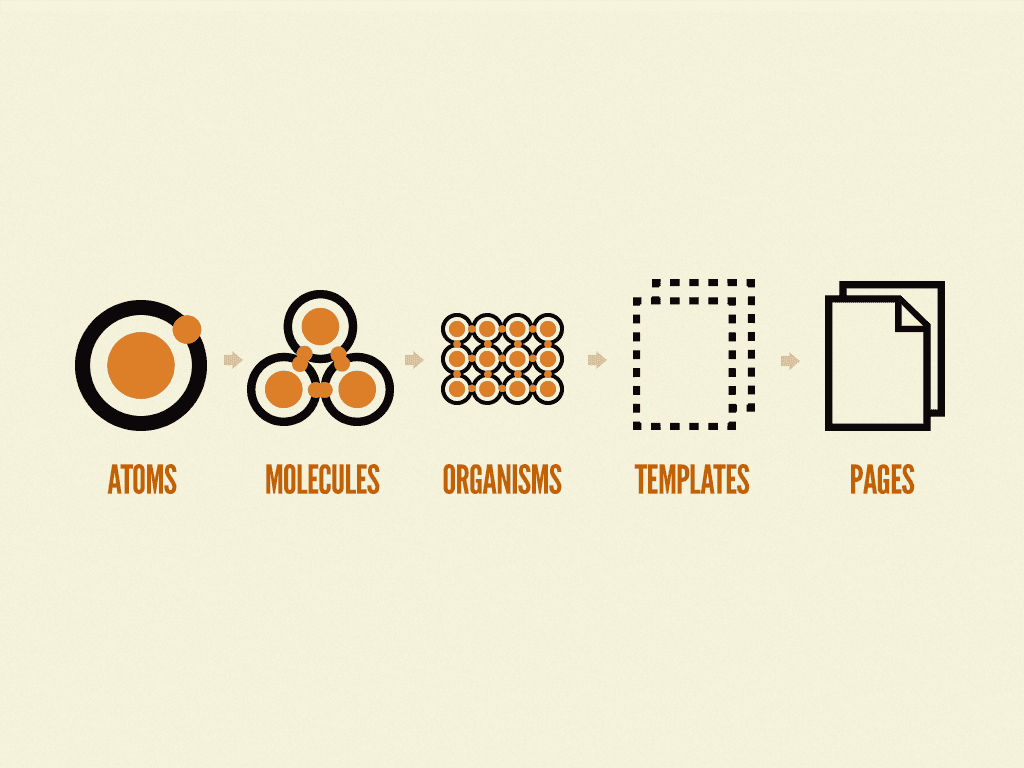
Atomic Design is a methodology introduced by Brad Frost that mirrors how chemists think about matter - everything is made of smaller, composable building blocks.
The five levels are:
- Atoms - The smallest, indivisible UI elements: buttons, inputs, labels, icons
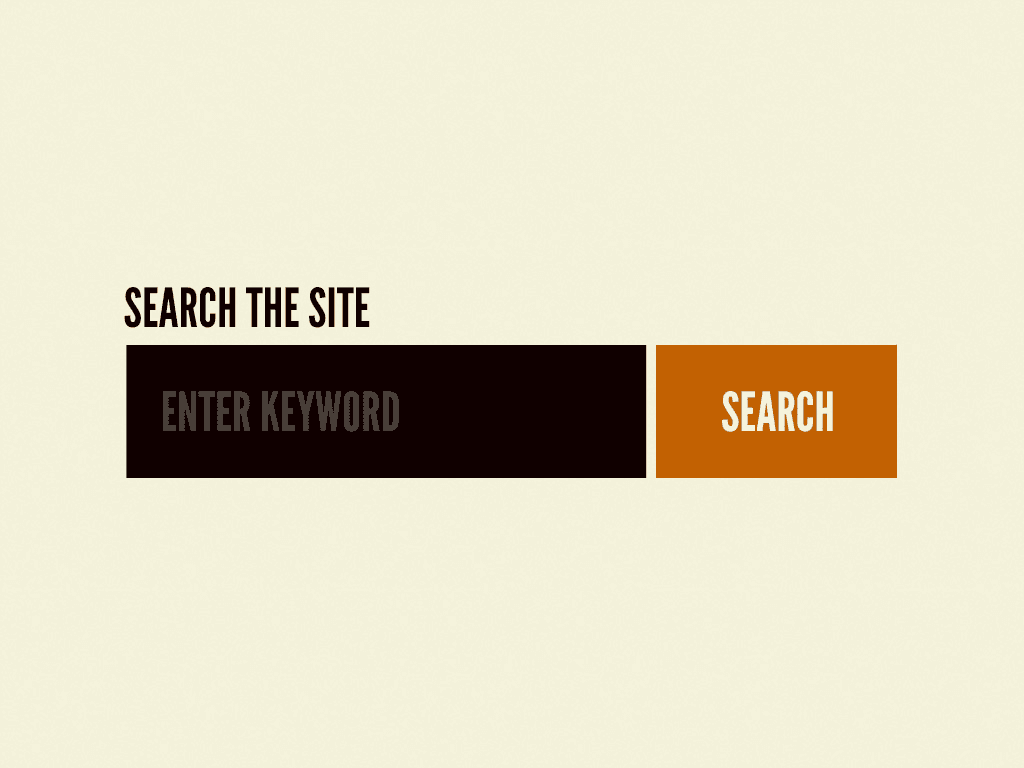
- Molecules - Simple groups of atoms functioning together: a search bar (input + button + icon)
- Organisms - Complex UI sections made of molecules: a navigation bar, a product card grid
- Templates - Page-level layouts with placeholder content, defining structure without data
- Pages - Templates hydrated with real content - what users actually see
The real power isn't the terminology. It's the discipline it brings to how you structure, name, and think about components.
Why Angular Is a Natural Fit
Angular was built for this. Its module system, dependency injection, and strict component boundaries make enforcing Atomic Design patterns straightforward compared to more loosely structured frameworks.
A few Angular features that align perfectly with Atomic Design:
Component encapsulation - Each Angular component owns its template, styles, and logic. Atoms and molecules stay self-contained with no style bleed.
NgModules (or standalone components) - You can group your design system layers into dedicated modules (AtomsModule, MoleculesModule) or use standalone components with barrel exports for clean imports.
@Input() / @Output() contracts - Atoms are highly configurable via clearly-defined inputs. A ButtonComponent doesn't know about business logic - it only knows its label, variant, and disabled state.
Content projection (ng-content) - Organisms and templates use content projection to stay flexible without becoming tightly coupled to child data.
Structuring the Project
A typical folder structure for an Angular design system looks like this:
src/
  lib/
    atoms/
      button/
      input/
      icon/
      badge/
    molecules/
      form-field/
      search-bar/
      card/
    organisms/
      navbar/
      data-table/
      sidebar/
    templates/
      dashboard-layout/
      auth-layout/
    tokens/
      colors.scss
      typography.scss
      spacing.scss
The tokens/ folder is critical - it houses your design tokens (CSS custom properties or SCSS variables) that flow through every layer. Colors, spacing, typography, border radius, and elevation all live here. If a designer wants to update the primary brand color, one token change ripples through the entire system.
Building the Atoms
Start simple. An ButtonComponent atom might look like this:
@Component({
  selector: 'ds-button',
  template: `
    <button
      [class]="'btn btn--' + variant"
      [disabled]="disabled"
      (click)="clicked.emit($event)"
    >
      <ng-content></ng-content>
    </button>
  `,
  styleUrls: ['./button.component.scss']
})
export class ButtonComponent {
  @Input() variant: 'primary' | 'secondary' | 'ghost' = 'primary'
  @Input() disabled = false
  @Output() clicked = new EventEmitter<MouseEvent>()
}
No business logic. No HTTP calls. No state management. It receives data and emits events - that's it. This purity is what makes atoms reusable across every surface in your application.
Composing Molecules
Molecules are where atoms start to collaborate. A SearchBarComponent composes the InputComponent, ButtonComponent, and IconComponent atoms into a single, meaningful unit:
@Component({
  selector: 'ds-search-bar',
  template: `
    <div class="search-bar">
      <ds-icon name="search" />
      <ds-input [placeholder]="placeholder" [(ngModel)]="query" />
      <ds-button variant="primary" (clicked)="onSearch()">Search</ds-button>
    </div>
  `
})
export class SearchBarComponent {
  @Input() placeholder = 'Search...'
  @Output() search = new EventEmitter<string>()
  query = ''

  onSearch() {
    this.search.emit(this.query)
  }
}
The molecule handles internal coordination, but the containing organism or page still drives the data flow.
Organisms and Templates: Where Business Context Enters
Organisms are where the design system starts to express domain awareness. A DataTableComponent organism might accept a generic data contract and compose molecule-level rows, headers, and pagination controls - but the specific data it receives comes from the page layer above.
Templates define the skeleton: where the sidebar goes, where the content area lives, how the navbar spans the viewport. They use Angular's router-outlet and ng-content to remain data-agnostic.
This separation keeps your design system portable. The same DashboardLayoutTemplate can serve a finance dashboard and an admin panel without modification.
Design Tokens: The Glue
Every well-built design system lives and dies by its tokens. In Angular, SCSS custom properties work well:
// tokens/colors.scss
:root {
  --color-primary: #2563eb;
  --color-primary-hover: #1d4ed8;
  --color-surface: #ffffff;
  --color-text-primary: #111827;
  --color-text-secondary: #6b7280;
  --color-border: #e5e7eb;
}
Every atom references tokens rather than hardcoded values. When the brand refreshes, tokens update - and the entire system follows.
Practical Benefits at Scale
The investment in Atomic Design pays off fast once a team grows:
Consistency - Developers can't accidentally invent a 13th shade of gray for a border. The atoms enforce visual consistency by design.
Speed - New features are assembled from existing molecules and organisms. Scaffolding a new page becomes a matter of arranging components, not building from scratch.
Testability - Atoms are pure, stateless, and easy to unit test. Testing a button's click emission is trivial. Testing a composed template is predictable because each piece has already been individually verified.
Designer-Developer alignment - When your component library mirrors the structure of your design tool (Figma, for example, can be organized the same way), handoffs become conversations instead of guessing games.
Storybook: Making It Tangible
No design system conversation is complete without mentioning Storybook. Running Storybook alongside your Angular app gives the team a live, interactive catalog of every atom, molecule, and organism - with all their variants, states, and edge cases on display.
It de-risks refactoring (you can see every affected component), accelerates onboarding, and gives designers a direct window into what's actually been built rather than what's hypothetically in a Figma file.
Where to Start
Don't try to boil the ocean. The practical path:
- Audit your existing components - Identify what's being duplicated across the codebase
- Extract your tokens - Pull out all hardcoded color, spacing, and typography values
- Start with atoms first - Get
Button,Input,Label, andIconright before moving up - Document as you go - A design system nobody can find or understand doesn't get used
- Iterate with real features - Build atoms in the context of shipping actual product work, not in a vacuum
The goal isn't perfection on day one. It's establishing a shared language between your code and your design - one that grows stronger every time a new component goes through the system rather than around it.
Angular's architectural principles and Atomic Design's structural thinking were built for each other. Done right, a design system built this way becomes the foundation every developer on the team reaches for first - because it's faster, more consistent, and more maintainable than anything they'd build themselves from scratch.
Related Reading
For more on the interface side of my work, see Building Better User Experiences at Full Sail and my write-up on portfolio filtering with Next.js and React Context. Both connect component decisions back to user-facing structure.
References
Frost, B. (n.d.). Atomic design. Atomic Design by Brad Frost. https://atomicdesign.bradfrost.com/
Share this article

Ryan VerWey
Full-stack developer, Army veteran, and founder of Echo Effect LLC. His experience timeline documents current Ratespedia CTO work, Department of War contractor work, and prior Army service. More about Ryan or see the work.
Recommended Reading
The Novelty Budget: Why Good Interfaces Borrow Before They Invent
A practical UI/UX framework for deciding which interface conventions to preserve, where novelty creates value, and how to test unfamiliar patterns.
The Confidence Trap: Cognitive Bias on Both Sides of the Screen
Cognitive bias shapes users and the teams building for them. Learn to question interface framing, test assumptions, and separate confidence from evidence.
Building an Intelligent Portfolio Filtering System with Next.js and React Context
See how I built a portfolio filtering system with intent presets, persistent state, accessible controls, and subtle highlights for content discovery.