Publish First, Syndicate Later: Automating Dev.to Without Losing SEO Credit
Automate Next.js portfolio blog syndication to Dev.to with images, four tags, a three-day delay, and canonical URLs.
If you publish articles on a Next.js portfolio or agency website, Dev.to can be a useful syndication channel. You get distribution in a developer community, another place for people to discover your work, and a canonical backlink pointing to the original article on your own domain.
The important part is order.
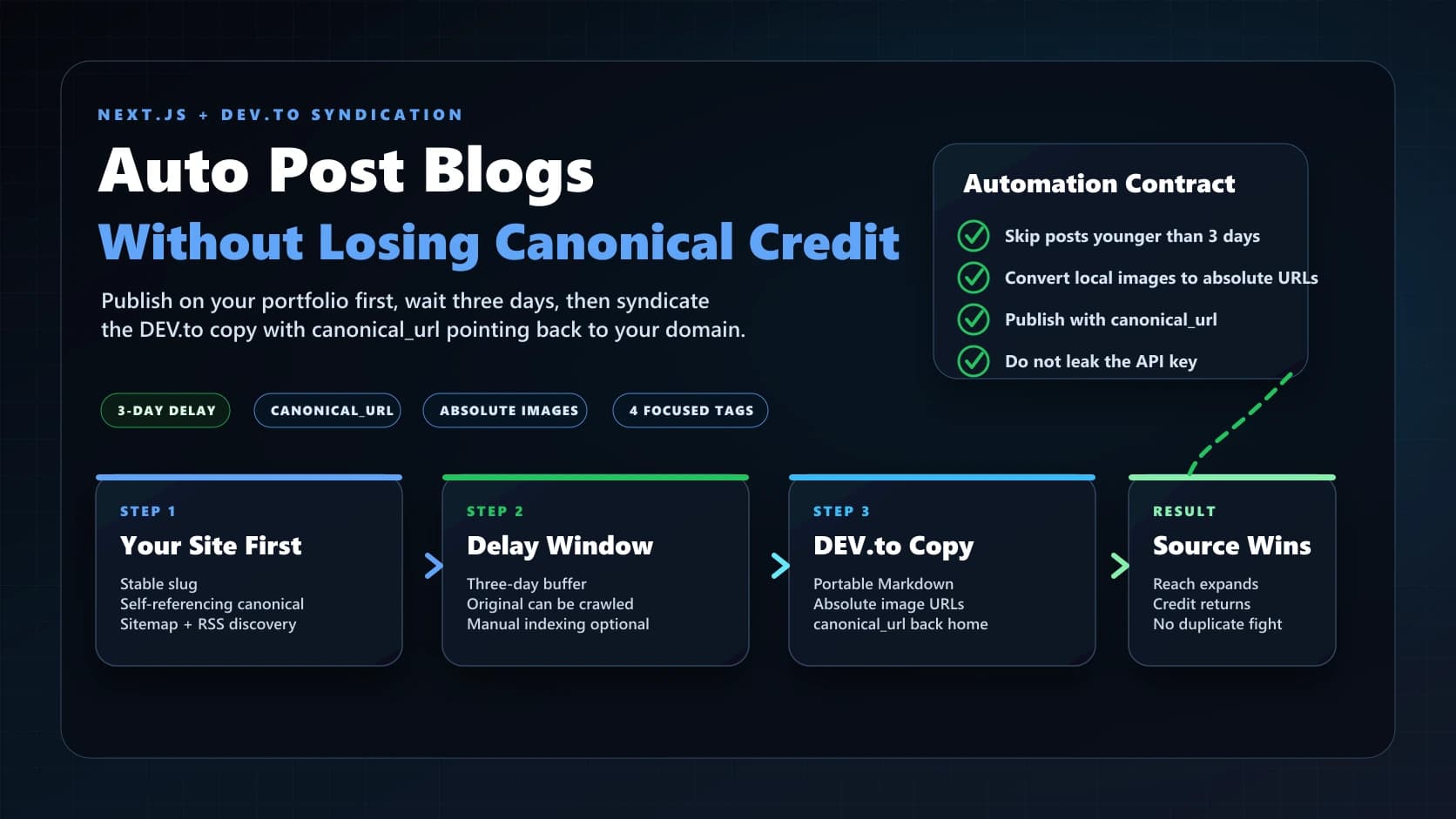
Publish on your website first. Give search engines time to crawl your original page. Then publish the Dev.to copy with a canonical URL that points back to your site. That is how you use syndication for reach without teaching Google that the copy is the source of truth.
This guide walks through a practical setup: a Next.js blog, an RSS feed or local Markdown files, a Dev.to API key stored as a GitHub secret, a daily GitHub Actions workflow, and a script that waits three days before posting.
Short answer: Publish the original post on your own domain, wait three days, then post the Dev.to copy with
canonical_urlset to your original URL. Include the cover image, convert body images to absolute URLs, and send no more than four Dev.to tags.
Why Syndicate to Dev.to at All?
Your portfolio blog is the source of truth. That is where you own the domain, the analytics, the internal links, the service pages, the calls to action, and the long-term SEO value.
Dev.to is different. It is a discovery channel.
When you syndicate correctly, Dev.to can help with:
- Getting technical articles in front of readers who may never find your personal site first.
- Creating a clean attribution path from a high-authority community platform back to your original post.
- Building repeatable distribution without manually copying every article.
- Keeping your writing workflow centered on your own website, not on rented platforms.
The danger is duplicate content confusion. If the same article appears on your site and on Dev.to at the same time, Google has to decide which URL represents the original. Google recommends using canonical links in the HTML head and using absolute URLs for canonical annotations. DEV also documents a canonical URL field for imported or manually created posts, specifically so the original source can keep SEO credit.
That is why the delay matters.
What the Three-Day Delay Does
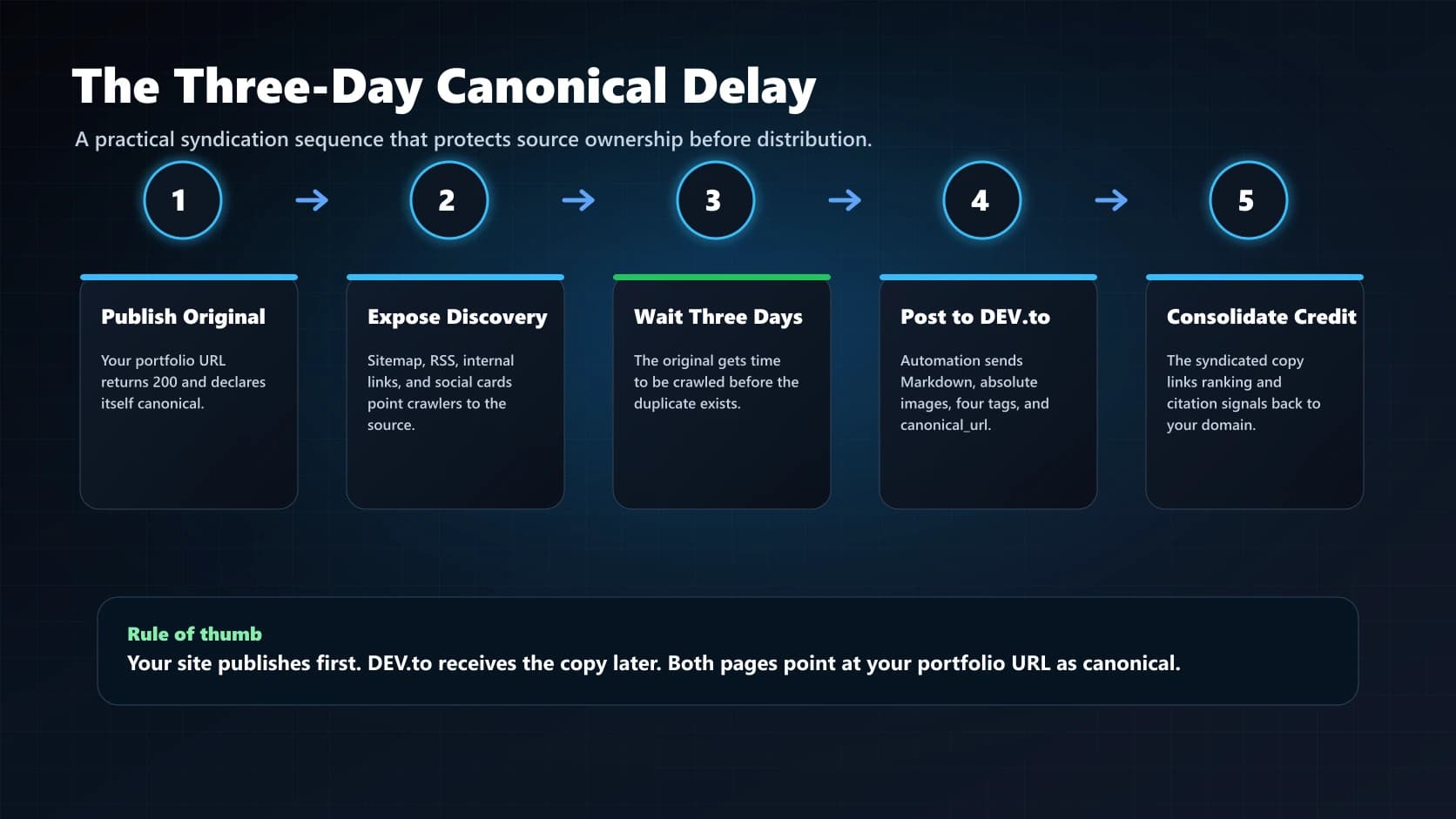
A three-day delay is not a magic ranking switch. It is a practical buffer.
When a new article goes live on your portfolio, you want search engines to see your domain first. The delay gives you time to:
- Deploy the post.
- Confirm the article URL returns
200. - Confirm the canonical tag on your site points to itself.
- Let your sitemap, RSS feed, and internal links expose the original before Dev.to sees the copy.
After that delay, the Dev.to version should point back to the original with canonical_url.
Think of the Dev.to article as a syndicated copy with a signpost. The signpost says, "This is useful here, but the original lives over there."
For high-priority posts, you can also request indexing in Google Search Console. Treat that as an acceleration option, not as a required step in the recurring automation.
What You Are Building
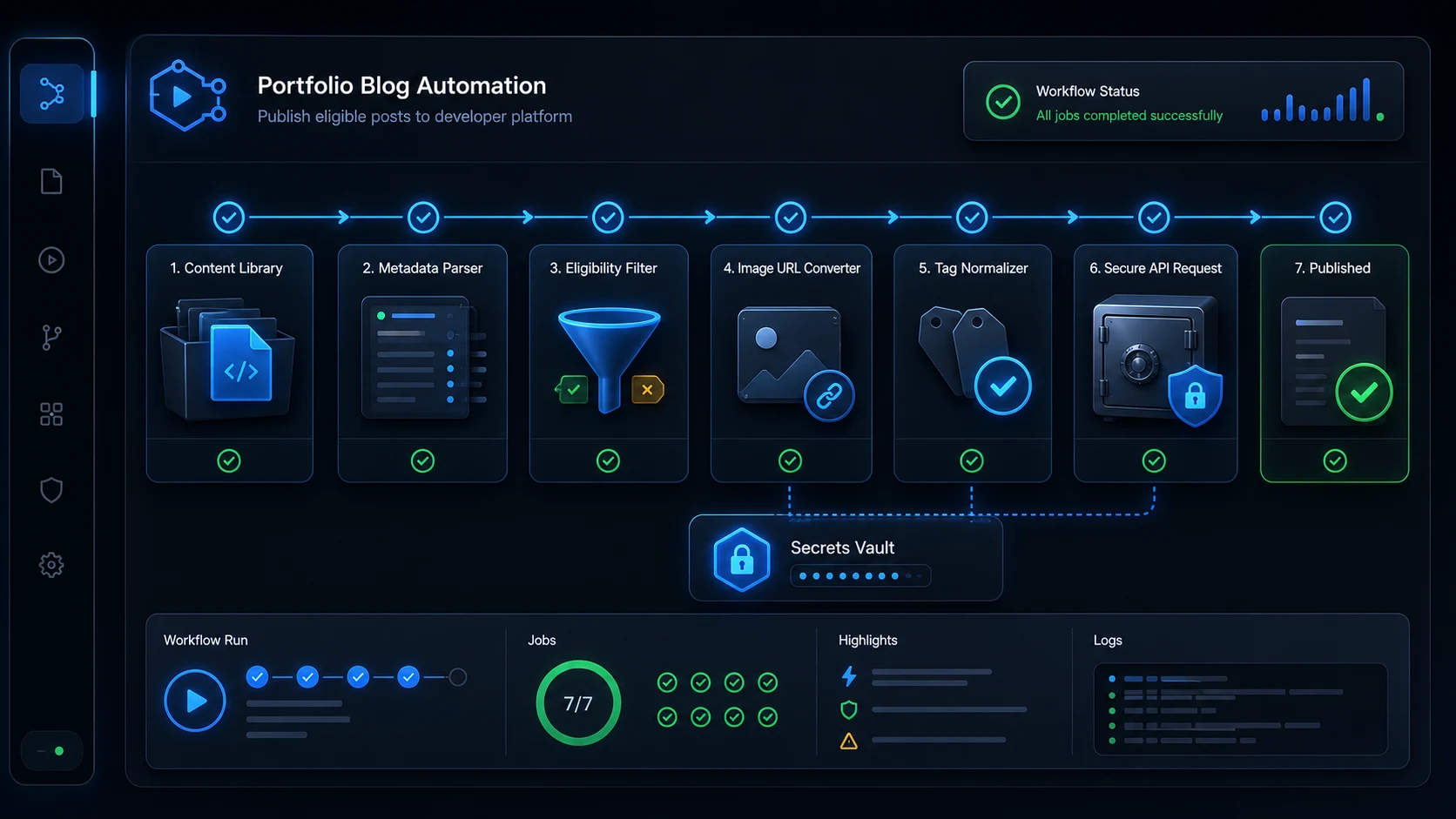
The automation has six parts:
- A Next.js blog source, usually Markdown or MDX files.
- A canonical URL for every article on your own domain.
- An RSS feed or script that can read each article's title, summary, body, date, image, and tags.
- A Dev.to API key stored outside your repo.
- A sync script that publishes only eligible posts.
- A scheduled GitHub Actions workflow that runs daily.
The workflow should do this every time it runs:
- Read all local blog posts.
- Skip posts newer than three days.
- Build the original URL from the post slug.
- Check Dev.to for an existing article with that canonical URL.
- Convert MDX or HTML-only content into Dev.to-friendly Markdown.
- Make images absolute so they work away from your website.
- Send up to four relevant Dev.to tags.
- Create the Dev.to article with
canonical_url.
Step 1: Confirm Your Next.js Blog Has Stable Slugs
Most Next.js portfolio blogs use one file per post:
content/blog/my-article-slug.mdx
content/blog/another-article.mdx
The filename becomes the URL:
https://www.yourdomain.com/blog/my-article-slug
Before you automate anything, make that contract reliable. Your script needs one predictable way to turn a file into a URL.
For example:
const SITE_URL = 'https://www.yourdomain.com'
const slug = fileName.replace(/\.mdx?$/, '')
const canonicalUrl = `${SITE_URL}/blog/${slug}`
Do not use localhost URLs, preview deployment URLs, random query strings, or relative canonical paths. The canonical URL should be the final public article URL.
Step 2: Add Self-Referential Canonical Tags on Your Site
Every original article should include a canonical tag in the HTML head that points to itself:
<link rel="canonical" href="https://www.yourdomain.com/blog/my-article-slug" />
In the Next.js App Router, this usually belongs in generateMetadata:
import type { Metadata } from 'next'

type PageProps = {
  params: Promise<{ slug: string }>
}

export async function generateMetadata({ params }: PageProps): Promise<Metadata> {
  const { slug } = await params
  const post = getBlogPost(slug)
  const canonical = `https://www.yourdomain.com/blog/${slug}`

  return {
    title: post.title,
    description: post.summary,
    alternates: {
      canonical,
    },
    openGraph: {
      title: post.title,
      description: post.summary,
      url: canonical,
      type: 'article',
      images: [
        {
          url: post.banner,
          width: 1200,
          height: 630,
          alt: post.title,
        },
      ],
    },
    twitter: {
      card: 'summary_large_image',
      title: post.title,
      description: post.summary,
      images: [post.banner],
    },
  }
}
Why this matters: your own page should clearly say, "I am the canonical version." The Dev.to copy will later say the same thing from the other direction.
Step 3: Make Your Blog Frontmatter Syndication-Ready
Each post needs enough metadata to become a Dev.to article without manual cleanup.
Use a frontmatter shape like this:
---
title: "How to Improve Your Portfolio Website"
date: "2026-08-18"
summary: "A practical guide to improving a portfolio website with better structure, speed, images, and calls to action."
tags: ["Next.js", "SEO", "Portfolio", "Web Development"]
category: ["Web Development"]
banner: "/images/blog/example-cover.webp"
updatedTime: "2026-08-18"
---
The key fields for Dev.to are:
| Field | Why It Matters |
|---|---|
title | Becomes the Dev.to article title. |
summary | Becomes the Dev.to description. |
date | Controls the three-day delay. |
banner | Becomes the Dev.to main_image. |
tags | Becomes Dev.to topic tags. |
Use a public image for banner. Dev.to is not reading your site from the same origin, so a local image path like /images/blog/cover.webp needs to be converted to https://www.yourdomain.com/images/blog/cover.webp before publishing.
Step 4: Decide How Images Should Travel
Images fail in syndication more often than text.
There are two image types to handle:
- The article cover image.
- Images inside the article body.
For the cover image, send Dev.to a public image URL:
main_image: absoluteUrl(post.banner)
For body images, convert local paths to absolute URLs before publishing:
function makeImageUrlsAbsolute(markdown, siteUrl) {
return markdown.replace(/!\\[([^\\]]*)\\]\\((\\/[^)]+)\\)/g, (_, alt, src) => {
return ``
})
}
If your posts use custom MDX components like this:
<BlogImage
  src="/images/blog/example.webp"
  alt="Dashboard on a laptop"
  caption="Use real images that explain the article."
/>
Convert them before sending to Dev.to:
function convertBlogImages(markdown, siteUrl) {
return markdown.replace(/<BlogImage\\s+([^>]*?)\\s*\\/>/gs, (_, attrs) => {
const src = attrs.match(/src=["']([^"']+)["']/)?.[1]
const alt = attrs.match(/alt=["']([^"']*)["']/)?.[1] ?? ''
const caption = attrs.match(/caption=["']([^"']*)["']/)?.[1]
if (!src) return ''
const imageUrl = src.startsWith('http') ? src : `${siteUrl}${src}`
const image = ``
return caption ? `${image}\\n\\n*${caption}*` : image
})
}
Why this matters: the Dev.to API accepts Markdown. It does not understand your custom React components. Convert the content before it leaves your site.
Step 5: Make Search Console Optional
The normal workflow should not depend on a person submitting every URL by hand. Your automation should rely on stable article URLs, self-referential canonicals, a sitemap, internal links, RSS discovery, and the three-day Dev.to delay.
For high-priority posts, request indexing for the original article as an optional acceleration step.
Click-by-click:
- Open Google Search Console.
- Select the property for your website.
- Click the URL Inspection search bar at the top.
- Paste the full original article URL.
- Press Enter.
- Wait for Google to inspect the URL.
- If the page is live, click Request Indexing.
- Wait for the confirmation message.
- Let the automated Dev.to workflow handle normal syndication after the three-day delay.
This is not required for Dev.to automation to work. It is useful when a post is especially important, timely, or tied to a campaign. For routine posts, let the automated workflow run without a manual Search Console task.
Step 6: Create a Dev.to API Key
Do this from the Dev.to website:
- Log in to Dev.to.
- Click your profile image in the top-right corner.
- Click Settings.
- Click Extensions in the settings sidebar.
- Scroll to DEV Community API Keys.
- Type a short label, such as
GitHub blog syndication. - Click Generate API Key.
- Copy the key once.
Do not paste the key into your source code. Do not commit it to GitHub. Do not put it in a public blog post, screenshot, issue, pull request, or README.
The key belongs in your automation environment.
Step 7: Store the API Key as a GitHub Secret
If your portfolio is on GitHub, store the key as a repository secret:
- Open your GitHub repository.
- Click Settings.
- In the left sidebar, click Secrets and variables.
- Click Actions.
- Click New repository secret.
- Name the secret
DEVTO_API_KEY. - Paste the Dev.to API key into the value field.
- Click Add secret.
Your workflow will read it as:
env:
  DEVTO_API_KEY: ${{ secrets.DEVTO_API_KEY }}
That keeps the key out of your repo while still making it available to the scheduled job.
Step 8: Install the Packages Your Script Needs
For an MDX or Markdown blog, a small Node script can usually do the job.
Install:
npm install gray-matter
If you already have gray-matter, you can skip that. Node 18 and newer includes fetch, so you do not need a separate HTTP client in most modern Next.js projects.
Step 9: Add a Safe Tag Mapper
Dev.to tags should be short, lowercase, and relevant. Most posts should use no more than four.
Your website tags may be human-readable:
tags:
  - Web Development
  - SEO
  - Content Marketing
Dev.to tags should look more like:
['webdev', 'nextjs', 'seo', 'productivity']
Add a mapper:
const TAG_MAP = {
  'Web Development': 'webdev',
  SEO: 'seo',
  'Content Marketing': 'contentmarketing',
  'Web Design': 'webdesign',
  JavaScript: 'javascript',
  Nextjs: 'nextjs',
}

function normalizeDevToTags(tags) {
  const normalized = tags
    .map((tag) => TAG_MAP[tag] ?? tag)
    .map((tag) => tag.toLowerCase().replace(/[^a-z0-9]/g, ''))
    .filter(Boolean)

  return Array.from(new Set(normalized)).slice(0, 4)
}
Why this matters: tags are distribution channels on Dev.to. Bad tags make the article harder to discover, and too many tags can cause publishing problems. Keep the set focused.
Step 10: Write the Sync Script
Create a file like this:
scripts/publish-devto.mjs
Here is a complete generic version you can adapt:
import fs from 'node:fs/promises'
import path from 'node:path'
import matter from 'gray-matter'
const SITE_URL = process.env.SITE_URL ?? 'https://www.yourdomain.com'
const DEVTO_API_KEY = process.env.DEVTO_API_KEY
const BLOG_DIR = path.join(process.cwd(), 'content', 'blog')
const THREE_DAYS_MS = 3 * 24 * 60 * 60 * 1000
const TAG_MAP = {
'Web Development': 'webdev',
'Web Design': 'webdesign',
SEO: 'seo',
'Content Marketing': 'contentmarketing',
JavaScript: 'javascript',
Nextjs: 'nextjs',
}
if (!DEVTO_API_KEY) {
throw new Error('Missing DEVTO_API_KEY.')
}
function postSlug(fileName) {
return fileName.replace(/\.mdx?$/, '')
}
function canonicalForSlug(slug) {
return `${SITE_URL}/blog/${slug}`
}
function absoluteUrl(url) {
if (!url) return undefined
if (url.startsWith('https://') || url.startsWith('http://')) return url
return `${SITE_URL}${url.startsWith('/') ? url : `/${url}`}`
}
function normalizeDevToTags(tags = []) {
const normalized = tags
.map((tag) => TAG_MAP[tag] ?? tag)
.map((tag) => String(tag).toLowerCase().replace(/[^a-z0-9]/g, ''))
.filter(Boolean)
return Array.from(new Set(normalized)).slice(0, 4)
}
function isAtLeastThreeDaysOld(date) {
const publishedTime = new Date(date).getTime()
if (Number.isNaN(publishedTime)) return false
return Date.now() - publishedTime >= THREE_DAYS_MS
}
function convertBlogImages(markdown) {
return markdown.replace(/<BlogImage\s+([^>]*?)\s*\/>/gs, (_, attrs) => {
const src = attrs.match(/src=["']([^"']+)["']/)?.[1]
const alt = attrs.match(/alt=["']([^"']*)["']/)?.[1] ?? ''
const caption = attrs.match(/caption=["']([^"']*)["']/)?.[1]
if (!src) return ''
const image = `})`
return caption ? `${image}\n\n*${caption}*` : image
})
}
function makeMarkdownPortable(markdown) {
return convertBlogImages(markdown)
.replace(/!\[([^\]]*)\]\((\/[^)]+)\)/g, (_, alt, src) => `})`)
.replace(/<Callout>\s*/g, '> ')
.replace(/\s*<\/Callout>/g, '')
}
async function devToRequest(endpoint, options = {}) {
const response = await fetch(`https://dev.to/api${endpoint}`, {
...options,
headers: {
'api-key': DEVTO_API_KEY,
'content-type': 'application/json',
...(options.headers ?? {}),
},
})
if (!response.ok) {
const body = await response.text()
throw new Error(`Dev.to request failed: ${response.status} ${body}`)
}
return response.json()
}
async function getExistingArticles() {
const articles = []
for (let page = 1; page <= 10; page += 1) {
const batch = await devToRequest(`/articles/me/all?page=${page}&per_page=100`)
articles.push(...batch)
if (batch.length < 100) break
}
return articles
}
async function publishArticle({ post, body, canonicalUrl }) {
return devToRequest('/articles', {
method: 'POST',
body: JSON.stringify({
article: {
title: post.title,
description: post.summary,
body_markdown: body,
main_image: absoluteUrl(post.banner),
canonical_url: canonicalUrl,
tags: normalizeDevToTags(post.tags),
published: true,
},
}),
})
}
async function main() {
const existingArticles = await getExistingArticles()
const existingCanonicals = new Set(existingArticles.map((article) => article.canonical_url).filter(Boolean))
const files = (await fs.readdir(BLOG_DIR)).filter((file) => /\.mdx?$/.test(file))
for (const file of files) {
const fullPath = path.join(BLOG_DIR, file)
const slug = postSlug(file)
const canonicalUrl = canonicalForSlug(slug)
const source = await fs.readFile(fullPath, 'utf8')
const { data, content } = matter(source)
if (!isAtLeastThreeDaysOld(data.date)) {
console.log(`Skipping ${slug}: younger than three days.`)
continue
}
if (existingCanonicals.has(canonicalUrl)) {
console.log(`Skipping ${slug}: already syndicated.`)
continue
}
const attribution = `*Originally published on [your portfolio](${canonicalUrl}).*`
const body = `${attribution}\n\n${makeMarkdownPortable(content)}`
const article = await publishArticle({
post: data,
body,
canonicalUrl,
})
console.log(`Published ${slug}: ${article.url}`)
await new Promise((resolve) => setTimeout(resolve, 3500))
}
}
main().catch((error) => {
console.error(error)
process.exit(1)
})
There are four important safety checks in that script:
- It refuses to run without
DEVTO_API_KEY. - It skips posts younger than three days.
- It checks existing Dev.to posts by
canonical_url. - It spaces out publish requests to avoid unnecessary API pressure.
Step 11: Add Package Scripts
Add scripts to package.json:
{
  "scripts": {
    "publish:devto": "node scripts/publish-devto.mjs",
    "publish:devto:dry-run": "node scripts/publish-devto.mjs --dry-run"
  }
}
If you want a safer first version, add a dry-run mode before allowing writes. A dry run should print what would be published without calling POST /articles.
For example:
npm run publish:devto:dry-run
The script should print skipped and published posts:
Skipping new-post: younger than three days.
Skipping old-post: already syndicated.
Published eligible-post: https://dev.to/username/eligible-post-slug
Step 12: Create the GitHub Actions Workflow
Create:
.github/workflows/devto-syndication.yml
Use a daily schedule plus a manual trigger:
name: Dev.to Syndication

on:
  schedule:
    - cron: '25 13 * * *'
  workflow_dispatch:

jobs:
  syndicate:
    runs-on: ubuntu-latest
    permissions:
      contents: read
    env:
      DEVTO_API_KEY: ${{ secrets.DEVTO_API_KEY }}
      SITE_URL: https://www.yourdomain.com
    steps:
      - name: Check out repository
        uses: actions/checkout@v4

      - name: Set up Node
        uses: actions/setup-node@v4
        with:
          node-version: 20
          cache: npm

      - name: Install dependencies
        run: npm ci

      - name: Publish eligible posts to Dev.to
        run: npm run publish:devto
The cron time does not need to be exact. Pick a quiet time. The script controls eligibility, not the workflow schedule.
Why daily works: a post published Monday at noon becomes eligible Thursday at noon. The next daily run after that will post it.
Step 13: Test the Workflow Without Publishing
Before publishing anything, test locally with a dry run or a temporary logging-only script.
Check:
- New posts are skipped.
- Old posts are eligible.
- Existing Dev.to posts are skipped.
- Canonical URLs are absolute and correct.
- Cover images are absolute.
- Body images are absolute.
- Tags are lowercase and limited to four.
- No API key is printed in the logs.
Then run the GitHub Action manually:
- Open your GitHub repository.
- Click Actions.
- Click Dev.to Syndication.
- Click Run workflow.
- Choose the branch.
- Click Run workflow again.
- Open the workflow run.
- Watch the log output.
The logs should show skipped or published posts, but never the API key.
Step 14: Verify the Dev.to Article
After the first publish, open the Dev.to article and check it manually.
Confirm:
- The title is correct.
- The cover image appears.
- Body images appear.
- Code blocks are readable.
- Tables still make sense.
- The top attribution link points to the original post.
- The Dev.to canonical URL points to the original post.
- Tags are relevant and not spammy.
If you use the Dev.to editor, you can also check the canonical manually:
- Open the Dev.to post.
- Click Edit.
- Open the post settings.
- Find Canonical URL.
- Confirm it matches your original article URL exactly.
In the basic Markdown editor, the same value may appear as frontmatter:
canonical_url: https://www.yourdomain.com/blog/my-article-slug
Step 15: Keep the Original URL Stable
Canonical syndication depends on stable URLs.
Avoid changing slugs after syndication. If you must change one:
- Add a permanent redirect from the old URL to the new URL.
- Update the Dev.to article's
canonical_url. - Update the attribution link.
- Re-submit the new original URL in Google Search Console.
- Confirm the old URL does not return a broken page.
Broken canonical URLs waste the value of the whole setup. A canonical tag that points to a 404 is not helping the original article.
Step 16: Build a Post-Publish Checklist
Automation should reduce manual work, not remove responsibility.
Use this automation-first checklist for every new article:
- Article is live on your own domain.
- Original page returns
200. - Original page has a self-referential canonical URL.
- Original page has a usable title and meta description.
- Cover image is public and absolute.
- Body images are public or convertible to absolute URLs.
- Three days have passed.
- Dev.to copy includes
canonical_url. - Dev.to copy includes the article image.
- Dev.to copy uses no more than four relevant tags.
- Dev.to copy includes attribution to the original post.
Optional for priority posts:
- Google Search Console indexing request is submitted for the original URL.
Why This Helps With Canonical Link Equity
"Link juice" is casual SEO language for link equity, authority, or ranking signals that flow through links and canonical relationships. The phrase is imperfect, but the practical goal is clear: you want the original article on your domain to receive the strongest possible credit.
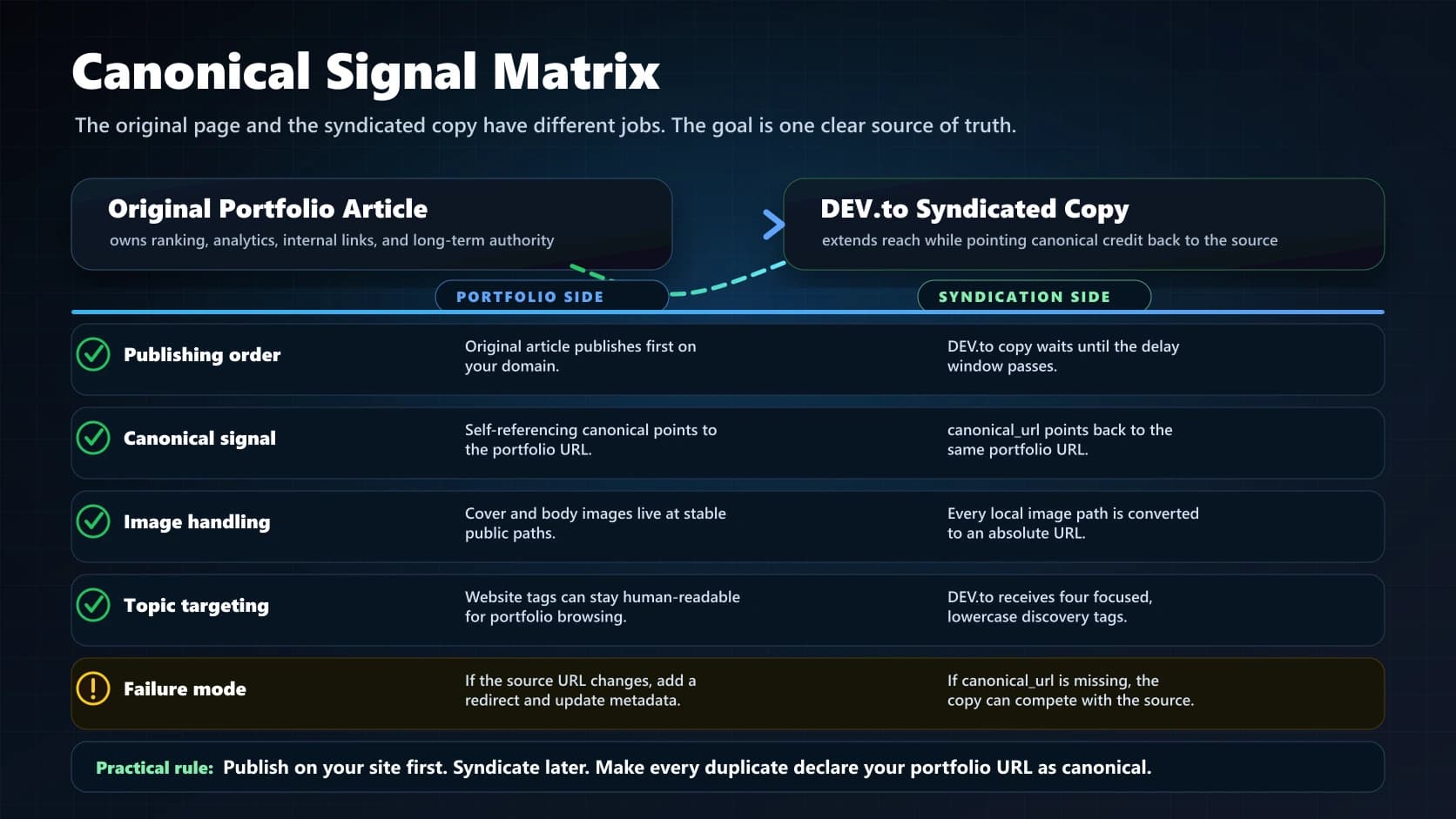
The setup supports that goal in four ways:
- Your site publishes first.
- Your original page declares itself canonical.
- Dev.to declares your original page as canonical.
- The Dev.to body includes a visible attribution link back to the original.
Google still makes its own canonicalization decisions, and canonical tags are signals, not commands. But consistent signals matter. If your own page, your sitemap, your RSS feed, your Dev.to copy, and your internal links all point to the same original URL, you are making the decision easy for crawlers.
That is the real purpose of the three-day delay. It gives the original article a head start before the high-authority duplicate appears.
Common Mistakes to Avoid
-
Do not publish to Dev.to immediately.
Give your site time to be crawled first. Three days is a practical default.
-
Do not forget the canonical URL.
Without
canonical_url, Dev.to may become the stronger version in search simply because the platform has more authority than your portfolio. -
Do not use relative image paths.
Dev.to cannot reliably render
/images/blog/example.webpunless it knows your domain. Convert it tohttps://www.yourdomain.com/images/blog/example.webp. -
Do not send every website tag to Dev.to.
Pick four relevant tags. Treat tags like reader targeting, not keyword stuffing.
-
Do not expose your API key.
Use GitHub Secrets, environment variables, or your deployment platform's secret manager.
-
Do not rewrite internal links to Dev.to.
If the goal is canonical value for your site, keep links pointing back to your original domain where appropriate.
Manual Fallback: RSS Import
If you do not want to use the API yet, Dev.to also supports RSS imports.
Click-by-click:
- Log in to Dev.to.
- Click your profile image.
- Click Settings.
- Click Extensions.
- Find Publishing to DEV Community from RSS.
- Paste your RSS feed URL.
- Enable Mark the RSS source as canonical URL by default.
- Save the feed settings.
- Review imported drafts before publishing.
RSS import is simpler. The API workflow gives you more control over the three-day delay, image conversion, existing-post checks, and tag mapping.
Final Recommended Workflow
For a Next.js portfolio, the cleanest process is:
- Write the blog post in your repo.
- Use an absolute cover image URL.
- Deploy the original post to your domain.
- Let the post sit for three days while your sitemap, feed, and internal links expose the original.
- Optionally request indexing in Google Search Console for priority posts.
- Run a scheduled GitHub Action every day.
- Have the script publish only eligible posts to Dev.to.
- Send
canonical_urlwith every Dev.to article. - Include the main image and convert local body images.
- Limit Dev.to tags to four.
- Periodically audit Dev.to to make sure every syndicated article points back to the original.
That is the balance: own the original, syndicate for reach, and make every duplicate point back to your domain.
Sources
- DEV Community Help, "Importing Your Organization's Content", accessed August 18, 2026.
- Forem API Docs, "Create a new article", accessed August 18, 2026.
- Google Search Central, "How to specify a canonical with rel=canonical and other methods", accessed August 18, 2026.
- DEV Team, "Revamped RSS Feed Imports", March 9, 2026.
Share this article

Ryan VerWey
Full-stack developer, Army veteran, and founder of Echo Effect LLC. His experience timeline documents current Ratespedia CTO work, Department of War contractor work, and prior Army service. More about Ryan or see the work.
Recommended Reading

Syndicating Your Personal Portfolio Blog to Dev.to Without Losing SEO Credit
Learn how to syndicate portfolio blog posts to Dev.to with RSS, canonical links, and a workflow that protects original SEO value.

Why Google Search Console Indexes Your Filter Pages as Separate URLs (And How to Stop It)
Learn why Google Search Console reports parameterized blog URLs and how Next.js metadata, canonicals, and crawl rules prevent indexing noise.

IONOS: Three Months, Two Websites, and a Cancellation That Wouldn't End
Read my IONOS cancellation experience, including months of support issues, reversed cancellation requests, and lessons for small business hosting.