Turning GitHub Language Stats Into a Profile Snapshot
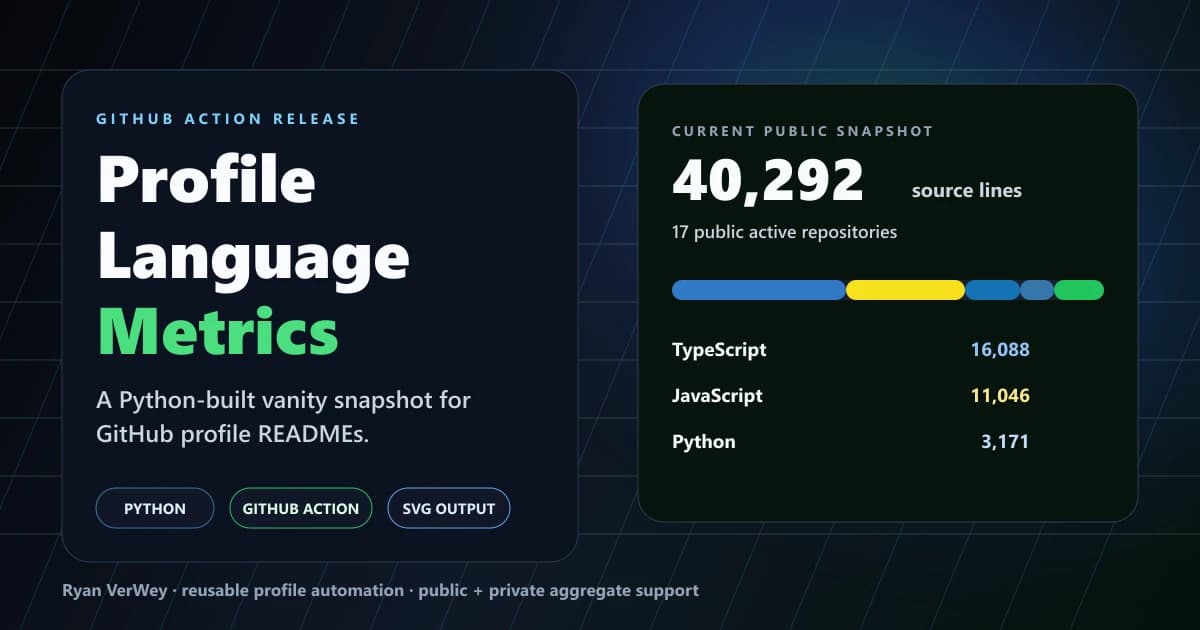
A release note and developer case study for profile-language-metrics, a Python GitHub Action that generates a polished language snapshot SVG for profile READMEs.
I built profile-language-metrics as a reusable GitHub Action that generates a clean language snapshot for a GitHub profile README. It is written in Python, runs on GitHub Actions, scans active repositories, estimates non-empty source lines by language, and writes a polished SVG that can be embedded directly into a profile page.
The short version: it is a vanity metric, but it is an honest one. It does not pretend to measure engineering value, productivity, or skill level by itself. It gives developers a lightweight way to show the shape of their public work, and it gives me another practical Python automation project that solves a real presentation problem.
Why I Built It
GitHub profile READMEs are weirdly useful.
They are part portfolio, part landing page, part proof-of-work surface. A good profile does not need to be loud, but it should give someone a fast read on what you build, what tools you use, and whether your work is active.
The problem is that most profile widgets either depend on a third-party service, show generic GitHub stats that everyone has already seen, or turn into visual noise. I wanted something smaller and more specific:
- a card that shows the language mix across my repos
- a scheduled workflow that keeps it updated
- no hosted dashboard
- no package install step
- no private repository names exposed
- a result that looks good embedded in Markdown
That made Python the right tool for the job. The project needed file walking, API calls, subprocess control, counters, text escaping, and SVG generation. None of that required a framework. It needed boring reliability more than a big dependency tree.
What the Action Generates
The current public run against my GitHub profile found 40,292 estimated non-empty source lines across 17 public active repositories. Python shows up with 3,171 lines in that snapshot, alongside TypeScript, JavaScript, CSS, HTML, Astro, Svelte, Vue, YAML, MDX, Shell, Batchfile, and TOML.
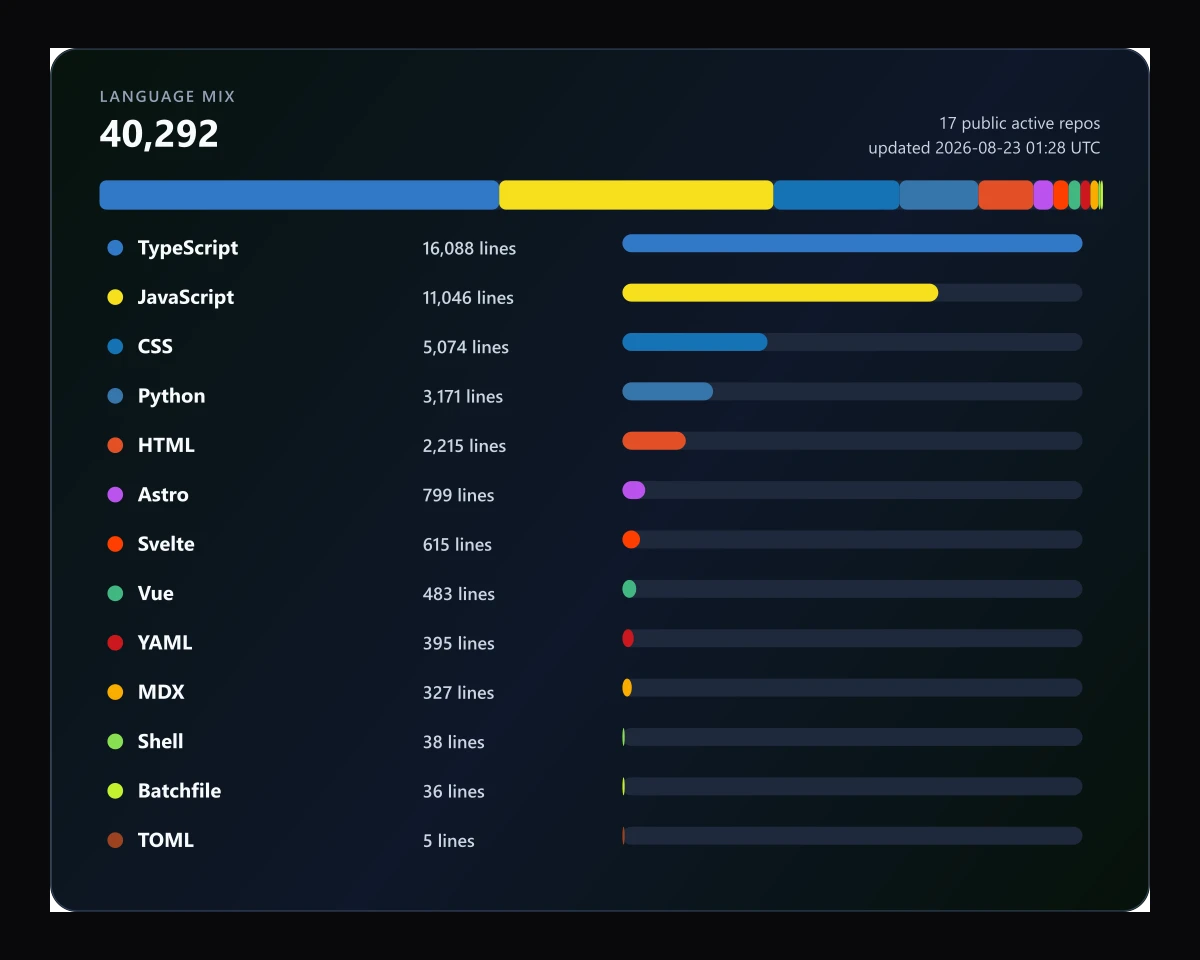
The output is intentionally simple: one SVG card with a total line count, active repository count, stacked language distribution, and per-language rows. It is built for a README, not a business intelligence dashboard.
That distinction matters. Line counts can be useful context, but they are not proof of seniority or quality. The value here is presentation: it turns scattered repository activity into a compact snapshot someone can understand in a few seconds.
How It Works
The action follows a predictable pipeline:
- Fetch eligible repositories from the GitHub API.
- Create a temporary, shallow, read-only checkout of each active repository inside the GitHub Actions runner.
- Walk source files and map extensions to languages.
- Count non-empty source lines.
- Render the aggregated result into an SVG.
- Let the profile workflow commit the generated file.
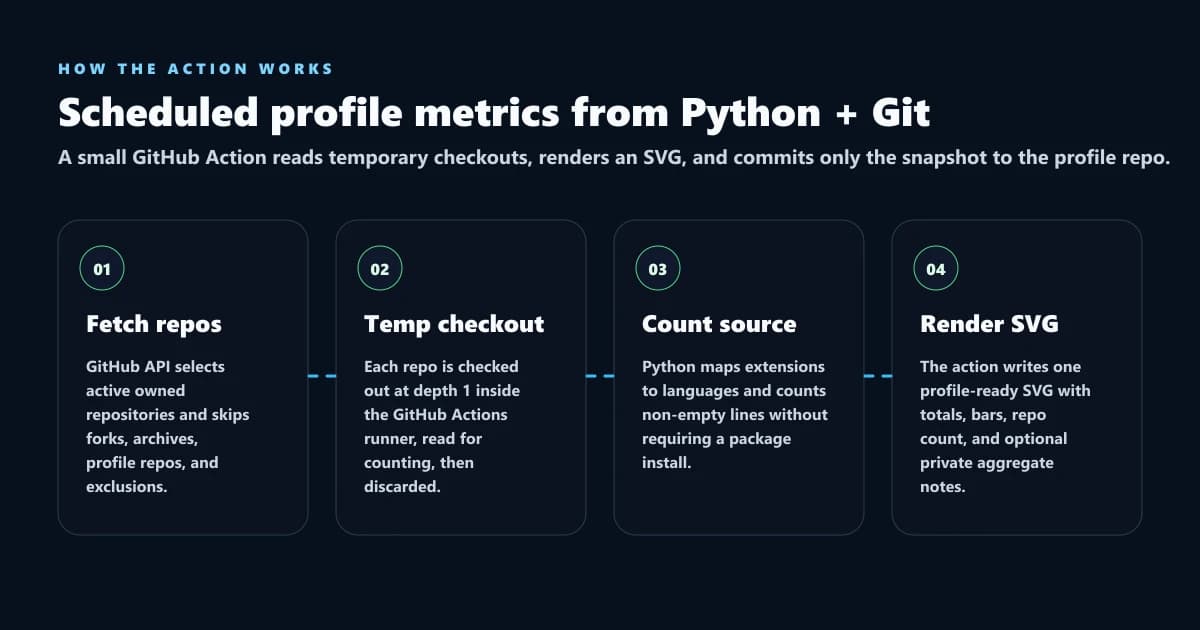
That clone step deserves plain-English context. The action is not sending your repository to a third-party server, creating a permanent mirror, or changing your project files. It runs inside your own GitHub Actions job, performs a depth-1 checkout in a temporary runner workspace, reads the files for counting, and lets that workspace disappear when the job finishes. The only file the example workflow writes back is the generated assets/language-metrics.svg in the profile repository where you installed the action.
The repo filtering is as important as the counting. The action skips forks, archived repos, disabled repos, profile repos, dependency folders, build output, lockfiles, minified files, and binaries. Without those exclusions, the output gets polluted fast.
The counting logic is deliberately conservative. It estimates non-empty source lines in recognized source files. It does not try to parse abstract syntax trees, classify generated code perfectly, or become a compliance-grade code inventory tool.
That restraint is part of the design. For a profile README, I would rather have a clear, repeatable estimate than a complex analysis system that feels more official than it really is.
Why Python Was the Right Fit
This is the kind of Python I like writing: practical automation that sits between services, files, and developer workflow.
The script has to do several jobs cleanly:
- call GitHub's API with optional authentication
- handle public-only and private-inclusive modes
- create temporary repository checkouts without mutating source repositories or leaking private paths into logs
- skip binary and generated files
- count text safely with encoding fallbacks
- aggregate language totals with
Counter - escape SVG text correctly
- write an output file that works in GitHub Markdown
The implementation stays dependency-free. It uses Python's standard library plus Git on the runner. That makes the action easier to trust because the user does not have to wait on npm install, audit a package tree, or wonder why a profile utility needs a heavy runtime.
Here is the kind of workflow a user can drop into a profile repository:
name: Generate language metrics

on:
  workflow_dispatch:
  schedule:
    - cron: "37 8 * * 1"

permissions:
  contents: write

jobs:
  generate:
    runs-on: ubuntu-latest
    steps:
      - uses: actions/checkout@v4
      - uses: RyanVerWey/profile-language-metrics@v1
        with:
          github_user_name: ${{ github.repository_owner }}
          output_path: assets/language-metrics.svg
That is the user experience I wanted: configure it once, run it manually when you want the first image, then let the scheduled workflow keep it current.
The Privacy Model
Private repository support needed a clear boundary.
The action can include private repositories when the caller supplies a token with the right access, but the generated SVG only shows aggregate totals. It does not write private repository names, URLs, or per-repo breakdowns into the image.
That tradeoff is intentional. A developer might want their private work represented in the overall language mix, but a profile README is still public. Aggregates are useful. Private project disclosure is not.
I also suppress clone command output when a token is present and disable Git Large File Storage smudge during clone. That keeps logs cleaner and avoids pulling large private assets that do not belong in a lightweight metrics run.
What This Shows About My Python Work
This project is not Python for Python's sake. It is Python used where Python makes the product simpler.
The code has to be comfortable with API boundaries, local file systems, subprocesses, temporary workspaces, string rendering, escaping, and operational edge cases. It also has to be packaged so another developer can use it without reading the entire implementation first.
That is the part I care about most: turning a script into a reusable tool.
A one-off script would have been easy. A release needs more discipline:
- clear inputs
- documented outputs
- safe defaults
- exclusion rules
- read-only private token guidance
- a license
- attribution notes
- a README that gets someone from zero to embedded SVG
That is the difference between "I wrote some Python" and "I shipped a Python-based developer tool people can use."
What I Would Improve Next
The release is useful now, but there are a few improvements I would consider:
- adding more language extensions as edge cases appear
- improving the stacked bar renderer for very small language segments
- offering a compact card variant for narrower profile layouts
- adding a JSON output for people who want to build their own visualization
- documenting a few example profile README layouts
I would still keep the core small. This kind of project gets worse if it tries to become a full analytics platform. The point is a clean profile snapshot, not an enterprise code intelligence system.
Try It
The project is public here: RyanVerWey/profile-language-metrics. If you like the release or end up using it in your own profile README, star the repo. That signal helps the project reach other developers who want a clean GitHub vanity snapshot without depending on a hosted badge service.
If you want a profile README card that shows your language mix without relying on a hosted badge service, add the action to your profile repository and let GitHub Actions commit the SVG. It is small, readable, MIT licensed, and built to be easy to understand.
For more context on the kind of developer work I build and publish, see my projects and about page.
FAQ
What is profile-language-metrics?
profile-language-metrics is a reusable GitHub Action that generates a profile-ready SVG showing aggregate source-line estimates by programming language across active repositories.
Is this a serious engineering metric?
No. It is a useful profile visualization, not a measurement of engineering quality, productivity, or business impact.
Why did you build it in Python?
Python fit the job: API requests, file walking, subprocess calls, counters, text escaping, and SVG rendering without pulling in a package install step.
Can it include private repositories?
Yes, if the caller supplies a token with access. Private repositories are shown only as aggregate totals, not as names, URLs, or per-repository details.
Who should use it?
Developers who want a clean GitHub profile README language snapshot that updates on a schedule and stays under their own repository control.
Share this article

Ryan VerWey
Full-stack developer, Army veteran, and founder of Echo Effect LLC. His experience timeline documents current Ratespedia CTO work, Department of War contractor work, and prior Army service. More about Ryan or see the work.
Recommended Reading

Application Integration and Security at Full Sail University
Review Application Integration and Security at Full Sail, covering Python, authentication, vulnerability scanning, containers, and secure deployment.

ImageFlex: Hosting a Dockerized WebP Converter on a Synology NAS
How I built ImageFlex, a local drag-and-drop image-to-WebP batch converter, and deployed it as a Docker container on my Synology NAS using Container Manager.
Advanced Server-Side Languages at Full Sail University
Review Advanced Server-Side Languages at Full Sail, covering TypeScript backend work, Express architecture, WebSockets, and cleaner API design.